


Microsoft Sites Not Loading? A Hidden IPv6 Setting Could Fix That in Seconds
By Corporal Punishmenton 01/01/2026 |

On my home network, Microsoft sites like apps.microsoft.com and support.microsoft.com either wouldn’t load at all or would sit there spinning for 30 seconds before finally responding. This has been happening for the last month or two, and this is kind of a big deal for a guy who makes his living picking apps for Windows and researching support documents. I also started noticing sites that ran Microsoft Clarity, https://clarity.microsoft.com/, a free behavioral analytics tool was having the same problem.
Other websites loaded instantly. Windows looked fine. No errors. Just Microsoft acting broken randomly.
That kind of selective failure usually points to DNS, because as one of my networking gurus used to say... “It's always DNS.” So that’s where the investigation started.
DNS Looked Fine, Which Made This Confusing
Fair warning: This started as one of those problems that don’t make sense, took forever to fix, and will eventually only help people with older hardware. But I wanted to share my deep dive into the IPv6 rabbit hole anyway.
Now, normally, it is the MajorGeeks way to not go through all the diagnostic gobblty gook and just give you the answer. But in this case, the hunt for the problem was frustrating, educational, and interesting. Also, I couldn't find any other documentation on this issue, so it's worth going through with the hope it helps someone directly.
Ok, let's dig in.
The system was already using Google DNS (8.8.8.8 and 8.8.4.4) as a name server. To rule that out completely, DNS was switched to Cloudflare (1.1.1.1 and 1.0.0.1) and my local ISP. No change.
The next step was basic testing:
Open the command prompt and type
ping apps.microsoft.com
This times out, which is semi-normal and pings to Microsoft's cloud domain service. There was packet loss (100%) that had me a bit worried, ut that could be how they set things up.
So I looked deeper:
type:
nslookup apps.microsoft.com
The lookup resolved immediately to Microsoft-owned Azure and Edge CDN addresses. That result was the key. DNS was doing its job.
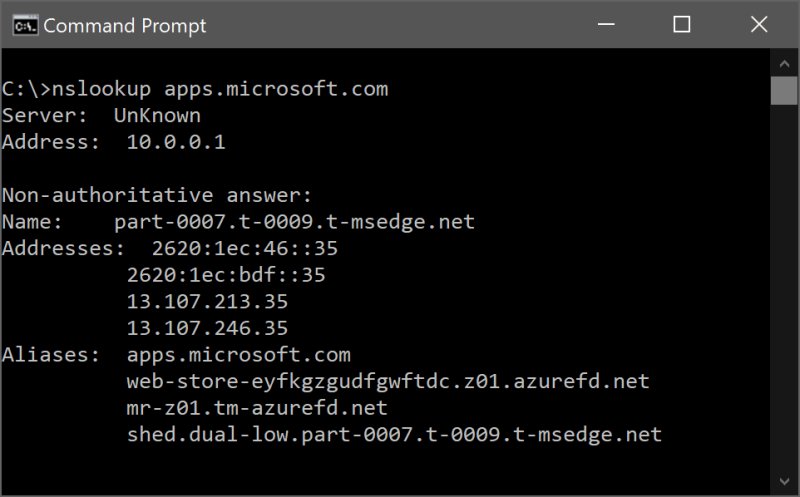
nslookup only tests name resolution, not routing quality, firewalls, or whether packets actually make it to their destination. If nslookup works, DNS is not the problem, and hence my Guru was wrong. Bummer.
But looking at the output revealed another important clue: IPv6 addresses were being returned and preferred, but the aliasing from Microsoft Azure DNS is what caught my eye. Not something I typically see. If you nslookup just Microsoft.com google.com or amazon.com, you don't see that. This is when I had one of those “AH HA!” moments, only to get more confused. (Hmm, maybe my Guru is still right?)
This can’t be an Azure alias issue, since the sites work fine everywhere except my home office network. This makes no sense, but hey, let's trudge forward.
Why Is This Happening Only Home My Network
Connecting through a phone hotspot made Microsoft sites load instantly. That officially ruled out Windows, browsers, DNS providers, and Microsoft itself. The problem only existed on the home network, which narrowed it down to the ISP or the router. I plugged directly into the ISP modem, and everything worked perfectly.
Ok, now we have our culprit. The router.
Its a Router Issue and Why
My router is an older Netgear Nighthawk x6 R model 8600 running firmware: 1.0.5.8-10.1.88. It's been rock-solid, works great, and is the last thing I think about upgrading. It's been a beast.
At first, it seemed logical to blame recent changes on my kid. He’s been running a local Minecraft server, and this made me more than suspicious of port forwarding or firewall rules he may have set up. But there were no custom rules, no port forwarding issues, no parental controls, and no obvious triggers. Nothing stood out.
This is where the tried-and-true, very scientific method of “toggle every damn setting until it's fixed or bricked” came in. This required multiple resets / reboots, several 4-letter words, and like four pots of coffee.
The Actual Fix: Disable 6to4 IPv6
I won’t bore you with the several dozen things that didn’t work, but the solution turned out to be simple and made perfect sense, once I found the setting.
In the Netgear router admin panel:
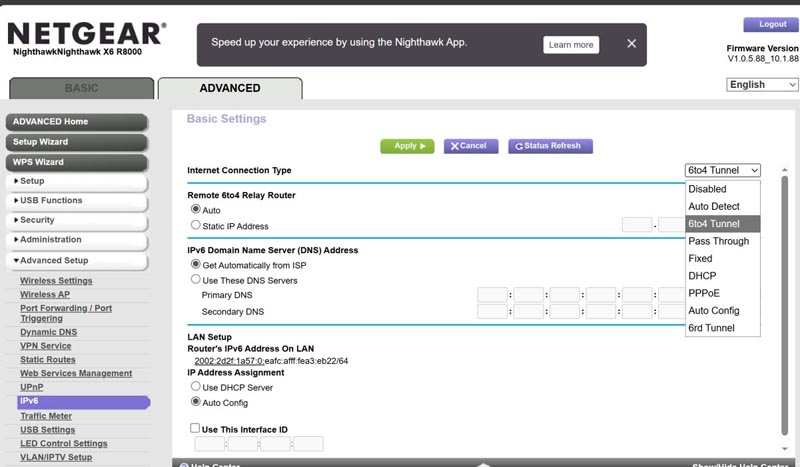
Advanced TAB → Advanced Setup → IPv6
The page looks clean, with no settings that need changing. Everything is set to “auto”. Should be good, right? Nope. Look at the upper right, there is a drop-down box, and the Internet Connection Type mode was set to 6to4 Tunnel.
Changing it to Disabled and rebooting the router immediately fixed the issue. Microsoft sites loaded instantly.
What is IPv6 6to4 and Why Does It Break Microsoft Subdomains.
Ok to get this, you need to understand a bit about IP addresses.
IPv4 is the original addressing system of the Internet and is still what most home/office networks rely on today. It uses familiar numeric addresses like 10.0.0.1 and works reliably, but it has a hard limit on the number of devices it can support. The IP address tells other computers where you are, like your postal address.
IPv6 was created to solve that limit problem by providing vastly more addresses and eliminating many of the workarounds IPv4 relies on. It has an address that is not so easy to remember, like 2001:0db8:85a3:0000:0000:8a2e:0370:7334.
6to4 is a bridge between the two. When IPv6 wasn’t widely available, 6to4 allowed IPv6 traffic to be wrapped inside IPv4 and sent across the Internet. When I purchased this router, IPv6 only had about a 15% adoption rate, so something was needed to bridge the networks.
Early in the IPv4-to-IPv6 transition, 6to4 was considered cool and innovative. Many routers in that time frame shipped with IPv6 6to4 out of the box or offered firmware updates to implement. I am not sure which was true of my router, but I am sure 6to4 was deprecated for over a decade and should not be running on my network.
Is Your Router Affected?
Probably not. If you can get to support.microsoft.com with no slowness, you’re fine, and you just learned something for no reason. You're welcome.
Most common on consumer routers set up in the early or mid-2010s, especially Netgear, Linksys, TP-Link, Asus, and ISP-supplied models that default to IPv6 in any compatibility mode, may have this problem. So take a peek at your setup and file this info away for later.
Newer router firmware has moved away from 6to4, favoring native IPv6 or disabling IPv6 entirely when the ISP doesn’t properly support it.
However, firmware updates don’t always reset existing settings, so routers that were originally configured years ago can quietly keep using 6to4 even after multiple updates. The router assumes the existing configuration is intentional and leaves it in place until a user changes it manually.
In my case, resetting the router defaults resets the box to 6to4, which is how this mess happened. I reset the router a few months back when I goofed something up and made the box inaccessible. POOF, 6to4 was back, and I had no idea. Mystery solved.
Pro Tip: Alternative Fix - Disable IPv6 on the PC
If you don’t want to or can't change router settings, you can fix this per machine:
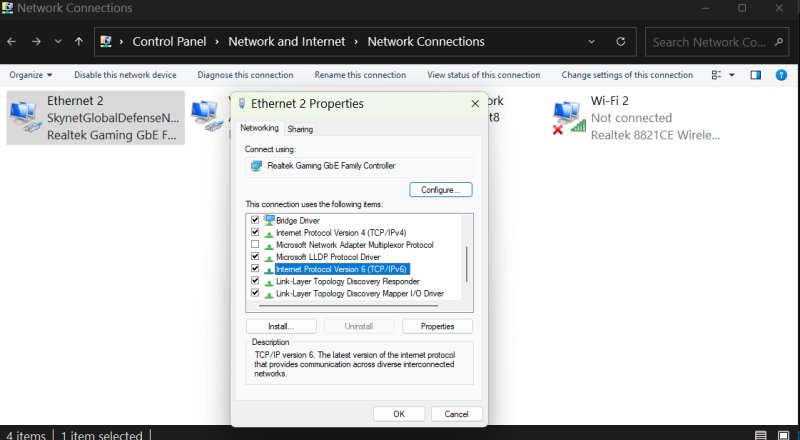
1. Open Control Panel
2. Go to Network Connections
3. Right-click your active adapter → Properties.
4. Uncheck Internet Protocol Version 6 (TCP/IPv6)
5. Click OK
6. Reboot
This forces Windows to use IPv4 and bypasses the broken IPv6 path.
Why Microsoft Services Fail
Honestly, I probably would never have noticed this issue if Microsoft services were running anything other than on Microsoft Azure DNS, which aggressively uses IPv6 whenever it’s advertised. Azure DNS is Microsoft’s proprietary DNS service that resolves domain names for Microsoft and Azure-hosted services, routing requests to the nearest healthy endpoint for performance. If your router claims IPv6 support, Azure assumes it works and uses it without assumptions.
To Windows, 6to4 appears to be a valid IPv6. In practice, it behaves like a fragile tunnel that drops packets, stalls connections, and breaks modern traffic patterns. It will work most times, but when it doesn't, it doesn't.
Unlike other DNS services, Microsoft Azure DNS does not seem to quietly fall back to IPv4 when IPv6 is flaky. When the IPv6 path is broken, connections stall or time out instead. That’s why Microsoft Store, support pages, Windows Update, and Edge services fail while everything else appears normal.
Microsoft assumes that if IPv6 is advertised, it should work correctly, and it exposes broken setups instead of hiding them. I am unsure whether this is a bug, a design choice, or something Microsoft engineers forgot to implement, like adding a movable Menu Bar to Windows 11. #StillSalty
But because the networking doesn't fail fast but takes 30+ seconds, and it is ONLY Microsoft Azure DNS that seems to be an issue, my money is on an oversight.
Final Thoughts
In the tech world, diving down rabbit holes is a real occupational hazard. This is why they make coffee. But, you usually learn something. In this case, I learned that my router is old, IPv6 adoption is picking up, and not to immediately blame my kids' Minecraft habit for my networking troubles.
What's inconclusive is whether my Gurtu was right. I think not, but it is DNS tangential, is it not?
Anyhow, if you have an older router and Microsoft sites are slow, unreachable, or timing out, but nslookup resolves them instantly, stop chasing DNS and other weird issues. Toggling your IPv6 setting to Disabled, rather than something like 6to4, is a safe, fast, and completely reversible tweak that should fix your problem instantly. Or, maybe it's just time for a new router. Recommendations?
comments powered by Disqus
